
Guide · Watch & sync

How to Connect Suunto to 42Runs
You can choose how to connect Suunto. Directly (recommended): you sign in with your Suunto account, your planned workouts reach your watch as SuuntoPlus Guides, and your runs come back. There is no pairing service in between, and this connection is separate from Garmin, Polar, Coros, Amazfit, and Apple Watch. Or through intervals.icu, the free pairing service you share with Garmin, Coros, and Amazfit. Use one or the other: if you connect directly, turn Suunto off on the intervals.icu Connections page, or the same workout can arrive twice.
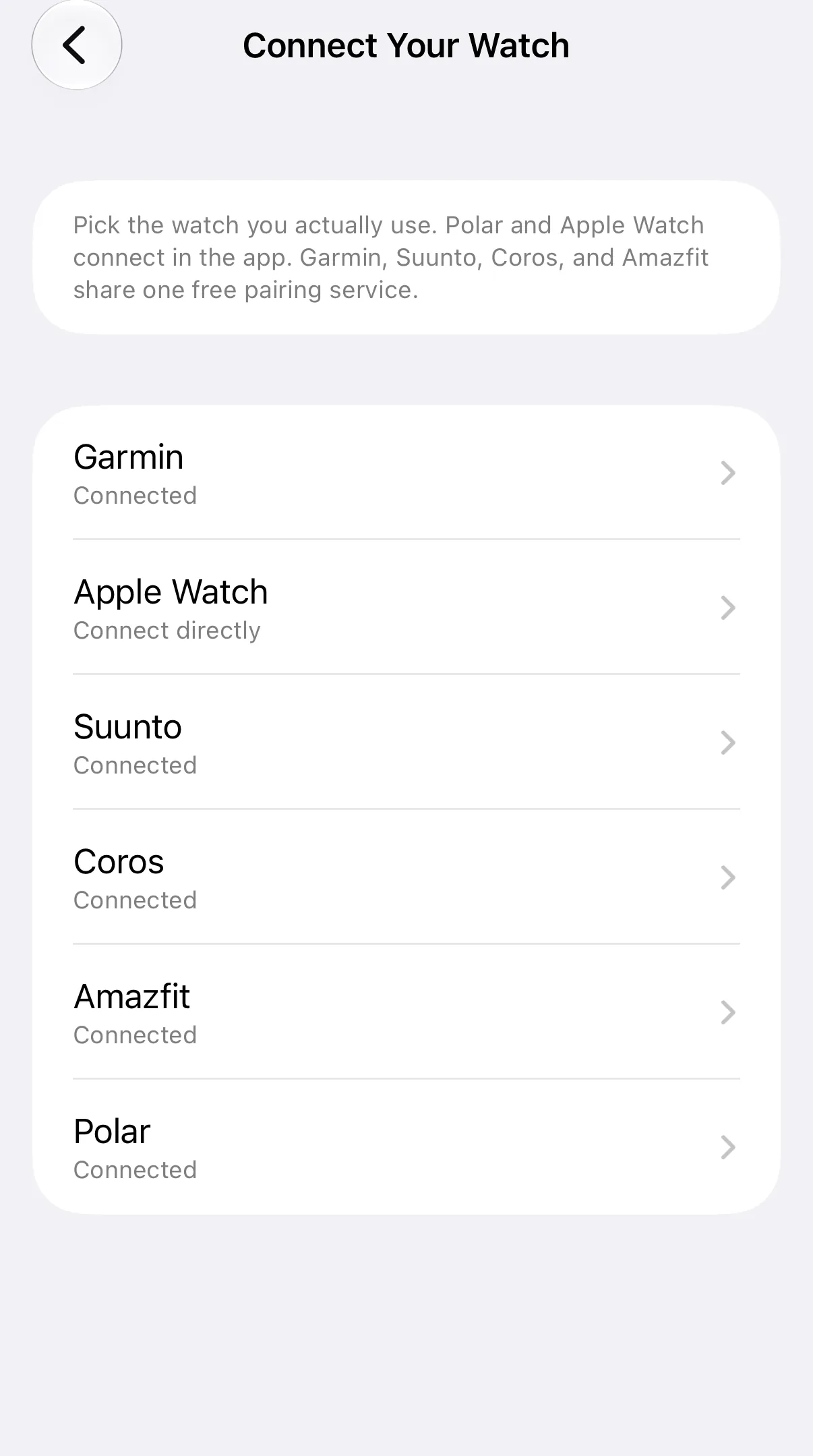
This works on iPhone and Android. Open Settings → Connect Your Watch → Suunto and pick how you want to connect.
If you already use Suunto through the pairing service, see the pairing-service steps. Apple Watch: connect Apple Watch to 42Runs. Other brands: pick your watch.
Connect
Choose Connect Suunto directly, then:
- Open Settings → Connect Your Watch and choose Suunto.
- Tap Connect Suunto.
- Sign in to your Suunto account and approve the connection.
When that finishes, the Suunto row shows Connected. Disconnecting Suunto later does not affect Garmin, Polar, Coros, Amazfit, or Apple Watch.
Do not also turn on Suunto on the intervals.icu Connections page while you use this direct connection. That is a different Suunto link, used by the pairing service. Using both at once can send the same workout twice.
What syncs
Planned workouts from your 42Runs calendar are sent as SuuntoPlus Guides. They do not appear in the Suunto app calendar. After you pair a watch, open the Suunto app, tap the watch icon (the sync screen), and open SuuntoPlus Guides. Sync the watch. On the watch, start a run on that day — Suunto can then offer that day’s Guide.
Without a paired watch, the Suunto app stays on Looking for device and the Guides list is hidden. The Guide can still be on your Suunto account.
Completed Suunto activities can come back to 42Runs from this same connection.
Watches that work
Suunto documents partner Guides on these models. These are the watches we treat as supported:
- Suunto Race 2
- Suunto Race
- Suunto Race S
- Suunto Vertical
- Suunto Vertical 2
- Suunto Ocean
Suunto also lists SuuntoPlus on the 9 family (9, 9 Baro, 9 Peak, 9 Peak Pro), 5 / 5 Peak, and 3. Those should work if the firmware and Suunto app are current. We have not checked every older model ourselves.
Suunto Run 2 is a different watch. Partner Guides (the kind 42Runs sends) are not expected to work there. Use a Race, Vertical, or Ocean if you want the workout on the wrist.
Keep the watch firmware and the Suunto app up to date, then sync after a workout lands on your 42Runs calendar.
What are SuuntoPlus Guides?
A SuuntoPlus Guide is a workout the watch can show you while you run, step by step: what to do, for how long, and the target (pace, heart rate, or effort). 42Runs sends your planned sessions as Guides, so the structure of the day is on your wrist.
- Open the Suunto app, tap the watch icon, and open SuuntoPlus Guides to see them and pin the ones you want on the watch.
- On the watch, start the activity on the day of the workout; the watch can offer that day's Guide.
- The target for each step (pace, heart rate, or effort) is shown on the watch while you run.
Suunto explains how Guides work in its own article: How to get started with SuuntoPlus Guides.
What your watch does with a Guide
- Before you start an activity, the watch checks whether there is a Guide for that day and offers it. You can accept it, pick a different Guide, or run without one.
- When a step starts, a short notification shows its target, for example the pace range or heart rate range.
- The watch shows your progress against that target while you run, and alerts you when you are outside the range.
- Your plan stays in 42Runs. If you change or move a workout, the Guide on your Suunto account is updated the next time 42Runs syncs, and the watch picks it up when you sync it.
If the Guide does not show up
- Update the watch software and the Suunto app.
- Check that the watch is paired and connected in the Suunto app, then sync it. Without a connected watch the Guides list stays hidden.
- Check that there is a workout on your 42Runs calendar for that day. The watch only offers a Guide when one exists for the day you start.
- Start an activity of the same sport as the workout, for example a run for a running workout.
- Open Settings → Connect Your Watch → Suunto and check that it says Connected. If not, connect again (see below).
Still no Guide? Contact us through Settings → Support in the app.
Connect again
If the connection stopped working, or 42Runs asks for new permissions, connect again: open Settings → Connect Your Watch → Suunto, tap Disconnect, then Connect Suunto and sign in. Your plans and history stay as they are.
If you used Suunto through the pairing service before, turn Suunto off on the intervals.icu Connections page first, so the same workout is not sent twice.
Disconnecting
On Settings → Connect Your Watch → Suunto, tap Disconnect. 42Runs stops talking to that Suunto account. Your plans and history in 42Runs stay as they are.
Suunto currently connects through the same free pairing service as Polar, COROS and Amazfit. The steps are on how to connect through the pairing service.
Other brands: pick your watch.